Contact
Hazel SMS program
Last updated August 21, 2026
Hazel members can choose to continue their Hazel conversations by SMS and receive related service messages.
How people opt in
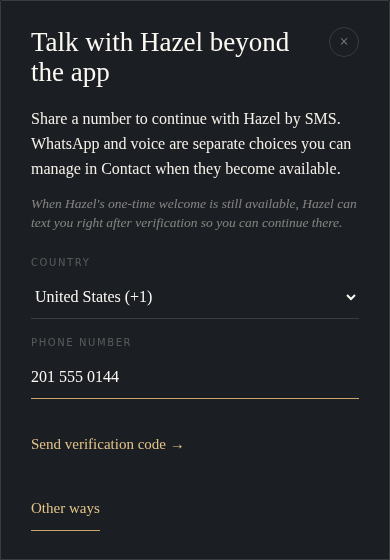
- A signed-in Hazel member opens Contact, chooses to add a number, and requests a six-digit verification code through Telnyx Verify. This verification message is separate from Hazel's recurring 10DLC SMS program.
- After receiving the code, the member sees the SMS-only consent shown below. The consent checkbox starts unchecked.
- The member enters the code, checks the consent box, and selects Verify & text me now. Hazel records consent only after verification succeeds.
SMS is optional. A member can keep using Hazel without providing a phone number or consenting to SMS.
Consent shown in Hazel
Because Hazel's functional opt-in is available only to authenticated members, the screenshots below show both stages of the actual form for carrier review. This public page does not collect a phone number or submit consent.
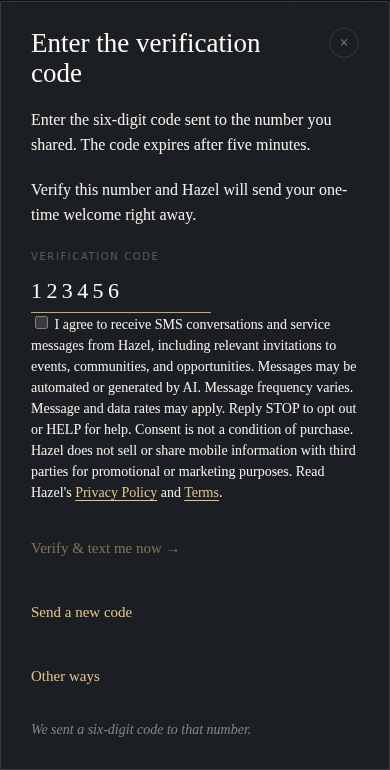
Enter the verification code
Enter the six-digit code sent to the number you shared. The code expires after five minutes.
Verify this number and Hazel will send your one-time welcome right away.
What messages to expect
Messages may include a one-time welcome, responses to messages the member sends Hazel, and relevant service invitations to events, communities, and opportunities. Messages may be automated or generated by AI. Message frequency varies. Message and data rates may apply.
Hazel does not use this SMS consent to send promotional or marketing text messages.
Help and opt-out
Reply HELP for help or email info@withhazel.ai.
Reply STOP to unsubscribe from SMS. Reply START to resubscribe. Members can also change their SMS choice in Hazel's Contact settings.